

What Is a Short Link?
A short link (also called a shortened URL) is a compressed version of a web address that redirects users to a longer URL.
Example:
- Original URL:
https://example.com/products/summer-sale-2026?utm_source=instagram&utm_medium=story - Short link:
https://linktra.cc/sales
Both links go to the same page. The short version is simply easier to share, read, and remember.
Short links work through a redirect. When someone clicks the short URL, the link shortener’s server receives the request and instantly forwards the visitor to the full destination URL. This happens in milliseconds — the visitor never notices.
Why Short Links Matter
You’ve probably seen a link like this:
It’s long, ugly, and impossible to remember. Try pasting that into a text message, a social media bio, or a printed flyer — it looks broken before anyone even clicks it.
That’s why millions of people create short links every day. A short link takes that chaos and turns it into something clean:
Same destination. Better experience.
Studies show that branded short links can increase click-through rates by up to 39% compared to generic long URLs!
Whether you’re sharing links on social media, in emails, or on packaging, knowing how to create a short link is a basic skill every marketer and business owner needs.
But creating a short link is only part of the story. If you want to understand performance, you also need to track what happens after someone clicks.
In this guide, you’ll learn exactly how to create a short link, the best tools to use, and how to track clicks for better results.
How to Create a Short Link (Step by Step)
Creating a shortened URL takes less than a minute. Here’s the general process that works across most short link generators:
Step 1: Copy Your Long URL
Open the page you want to share and copy the full URL from your browser’s address bar.
Step 2: Open a Link Shortener
Go to any URL shortening tool. Popular free options include LinkTrace, TinyURL, and Bitly.
Step 3: Paste and Shorten
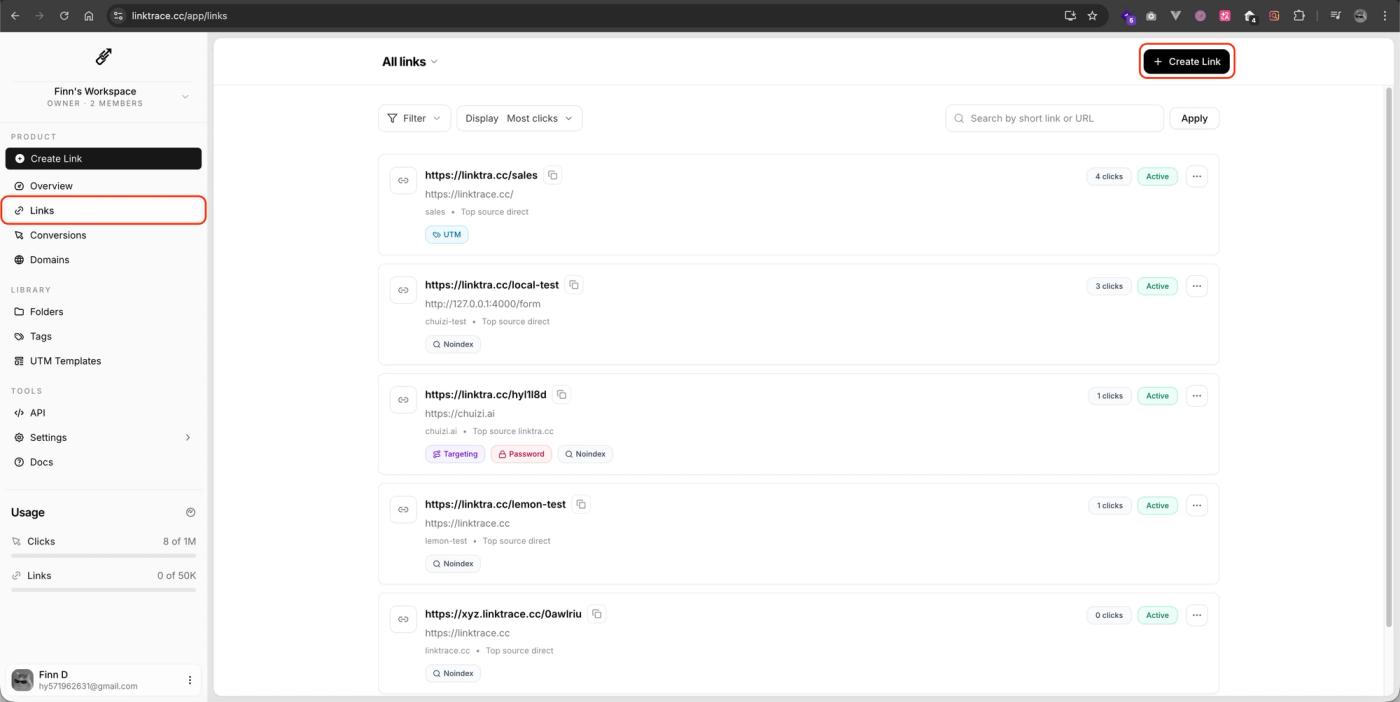
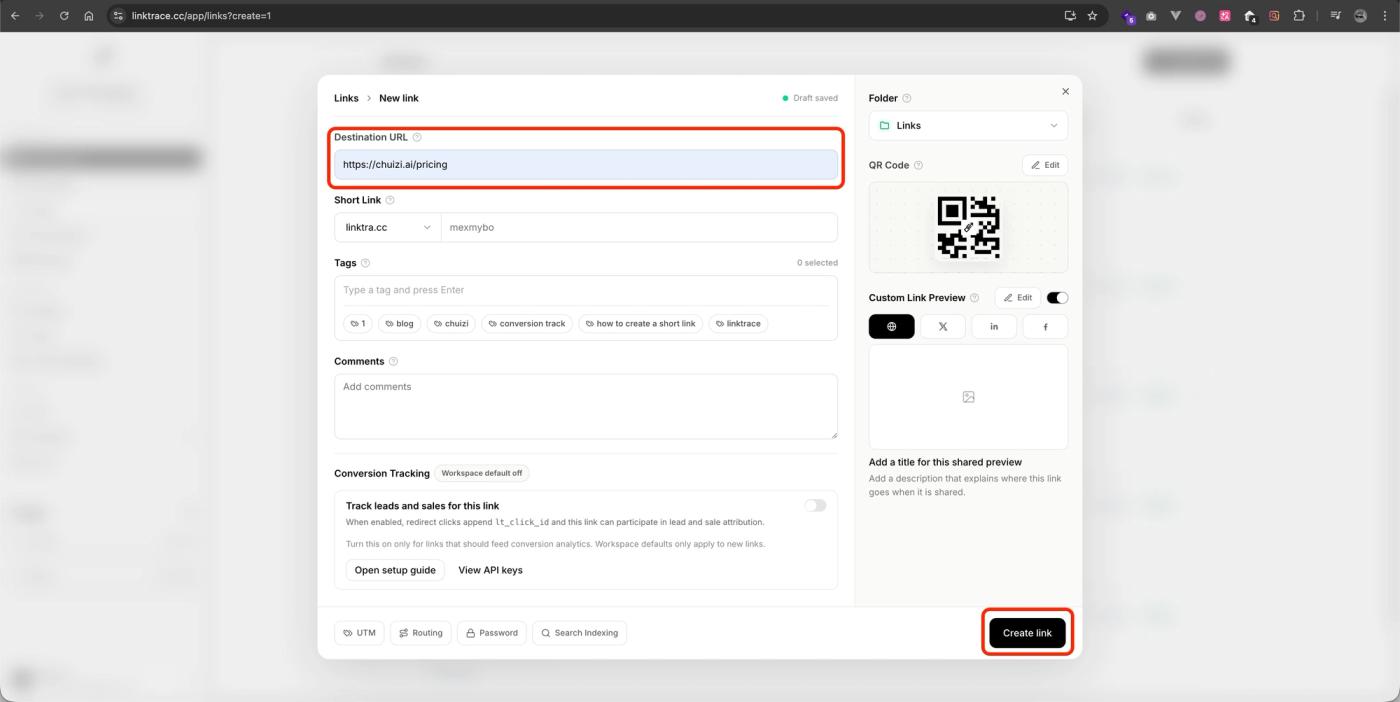
Enter user dashboard, click “Create Link“ button, then paste your link into the tool and click “Create link”.
Step 4: Copy Your New Short Link
The tool generates a short link instantly. Copy it and use it wherever you need — social posts, emails, QR codes, ads, or printed materials.
Step 5 (Optional): Customize the Link
Most tools let you edit the back-half of the link. Instead of linktra.cc/x7kQ3, you can create linktra.cc/sales. Custom slugs are more memorable and build trust with your audience.
That’s it. You now know how to shorten a URL in five simple steps.
Common Methods: Manual vs Tools
There are two main approaches to creating short links:
Online Short Link Tools (Recommended for Most People)
Tools like LinkTrace, Bitly, TinyURL, and Rebrandly let you shorten URLs through a simple web interface. No technical skills needed.
Pros:
- Free and instant
- Custom slugs available
- Some offer analytics
Best for: Marketers, creators, business owners, and anyone sharing links regularly.
Manual Redirects (Technical)
Pros:
- Full control over your domain
- No third-party dependency
Cons:
- Requires technical knowledge
- No built-in analytics
- Time-consuming to manage at scale
Best for: Developers or teams with specific infrastructure requirements.
For 95% of use cases, an online link shortener is the faster, easier choice.
Limitations of Basic Short Link Tools
Free URL shorteners solve the length problem, but most stop there. If you're using short links for marketing, you'll quickly run into gaps:
- No click tracking. You can't see how many people clicked your link.
- No traffic source data. You won't know if clicks came from email, social, or ads.
- No conversion tracking. Clicks don't tell you who actually bought, signed up, or converted.
- No A/B testing. You can't compare two links to see which performs better.
- Link rot risk. Some free services shut down or expire links after a period of inactivity.
For personal or one-off sharing, these limitations don't matter much.
But if you're running campaigns, spending money on ads, or trying to understand your audience — you need more than a basic shortener.
A Better Approach: Short Links With Tracking
This is where a tool like LinkTrace fits in.
LinkTrace is a link tracking and attribution platform that also creates short links.
Instead of shortening a URL and hoping for the best, you get data on what happens after the click.
What LinkTrace adds beyond basic shortening:
- Click analytics — See exactly how many people clicked, when, and from where.
- Traffic source attribution — Know whether clicks came from Instagram, email, Google Ads, or a podcast show-notes page.
- Conversion tracking — Connect clicks to actual outcomes like purchases, signups, or form submissions.
- Campaign dashboards — View all your links and their performance in one place.
- Custom branded links — Use your own domain for a professional appearance.
If you're already investing time creating content and sharing links, LinkTrace helps you understand which efforts actually drive results — without needing to stitch together UTM parameters and Google Analytics reports manually.
How to Track Short Link Clicks
Tracking clicks on your short links depends on the tool you use:
Method 1: Built-in Tracking (Recommended)
Using a tool like LinkTrace, you can instantly track:
- Click count
- Traffic source
- Device and location
- Conversion data
No extra setup. Just create the link and check back.
Method 2: UTM Parameters + Analytics
You can append UTM tags to your destination URL before shortening it:
https://yoursite.com/landing?utm_source=twitter&utm_medium=social&utm_campaign=spring_launch
Then shorten the tagged URL. Google Analytics (GA4) will attribute traffic to the source you specified.
This works, but it's manual and error-prone — one typo in a UTM tag can break your reporting.
Method 3: Advanced Tracking (Pixels)
Some advanced link tools let you attach retargeting pixels (Meta, Google, TikTok) to your short links. This means anyone who clicks your link can be added to a retargeting audience — even if they don't convert immediately.
For most marketers, Method 1 (a tool with built-in tracking) provides the best balance of simplicity and depth.
7 Tips to Improve Short Link Performance
- Use custom slugs. yoursite.co/free-guide outperforms yoursite.co/3xK9m in click-through rate every time.
- Keep links short and readable. Aim for 2–3 words in the slug. Avoid numbers and random characters.
- Match the link to the context. A link in a professional email should look different from one in a TikTok bio.
- Track everything. If you're sharing a link in more than one place, create separate short links for each channel so you can compare performance.
- Test placement. Links placed early in a social post or email typically get more clicks than those buried at the bottom.
- Use HTTPS. Ensure your short links use HTTPS. Browsers flag non-secure links, which kills trust.
- Audit old links quarterly. Check that your short links still resolve correctly. Broken links waste traffic and hurt credibility.
FAQ
Is it free to create a short link?
Yes. Most tools offer free short link creation. Advanced tracking features may require paid plans.
Are short links safe?
Yes, if you use trusted tools. Avoid clicking unknown links from unverified sources.
Do short links expire?
Some tools expire links after inactivity. Others keep them active as long as your account exists.
Can I use my own domain?
Yes. Many tools allow branded domains like `yourbrand.co/link`.
How do I track link clicks?
Use a tracking-enabled tool like LinkTrace to monitor clicks, sources, and conversions in real time.
Conclusion
Knowing how to create a short link is simple — paste a URL, click a button, done. The real question is what happens next.
If you're sharing links casually, any free shortener works. But if you're a marketer, creator, or business owner who needs to know which links drive real results, pair your short links with tracking from the start.
👉 Ready to create and track your short links? Try LinkTrace free.
Wondering who clicked your link? Learn what you can actually see, how link tracking works, and how to get real insights from every click.
Track short link clicks in real time and see where your traffic comes from. A simple, beginner-friendly guide to link tracking and performance insights.
Learn how to create a custom short link that builds trust, boosts clicks, and strengthens your brand — plus how to track link performance effectively.